Guide to Technology

eg: UK or Brides UK or Classical Art or Buy Music or Spirituality
 
eg: UK or Brides UK or Classical Art or Buy Music or Spirituality
 
Business & Money
Technology
Women
Health
Education
Family
Travel
Cars
Entertainment
Featured Sites
SD Editorials
Online Guide and article directory site.
Foodeditorials.com
Over 15,000 recipes & editorials on food.
Lyricadvisor.com
Get 100,000 Lyric & Albums.
  • Business & Money
    • A Guide to Business
    • Guide to Finance
    • Ideas for Marketing
    • Legal Guide
    • Guide to Insurance
    • Lettre De Motivation
    • Guide to the Stock Market
    • Human Resource Career
    • Sales Marketing
    • Forex & Trading
    • Advertising & Marketing
    • Startup Guide
  • Technology
    • Guide to Technology
    • Cell Phones
    • Computer Software
    • IT Hardwares
    • Internet
    • Online Security
    • Cameras
    • Search Engine Optimization
    • Science & Technology
  • Women
    • Guide to Women
    • Relationship Advice
    • Marriage
    • Jewelry
    • Pregnancy
    • Fashion Style
    • Divorce Guide
    • Wedding Guide
    • Dating Guide
    • Natural Beauty
  • Health
    • Guide to Health
    • Guide to Medical
    • Plastic Surgery
    • Weight Loss
    • Sports
    • Body Wellness
    • Cancer Treatment
    • Common Illness
    • Health & Lifestyle
  • Education
    • Military Service
    • Politics and Policy
    • Arts & Humanities
    • Education and Teaching
    • Learn Languages
    • Colleges & Universities
  • Family
    • Quality Home Improvement
    • Hobbies and Interests
    • Family Guide to
    • Pet Guide
    • Loans Guide
    • Credit Cards
    • Gardening Guide
    • Home Security
    • Real Estate
    • Home Decor
    • Gift & Present
  • Travel
    • The Travel Guide
    • Adventure Travel
    • Cruise Ships
    • Beach Holiday
    • Travel Accommodation
    • Holiday Destinations
  • Cars
    • Information on Cars
    • Traffic Violations
    • Auto Insurance
    • Trailers
    • Sport Cars
    • The Bikes
  • Entertainment
    • Entertainment Guide
    • World Music
    • Photo & Video
    • Television & Games

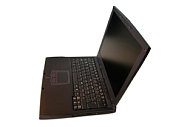
How To Buy A Laptop Computer

    View: 
When planning to buy a cheap laptop computer, you need to consider factors that go well beyond performance and memory. You need to consider many factors like size, weight, screen dimensions, battery life, keyboard quality, built-in memory, and also certain other options like wireless connectivity.


Let us now consider some key features you need to consider when buying your laptop.

Processor

Choosing the right processor is a very important task because the processor determines how quickly a laptop can run applications and perform on-screen tasks. Don't settle for anything less than 1.4 GHz. This is enough for everyday work-word processing, spreadsheets, e-mail etc. Pentium M processors are good for this purpose. These processors are fast and allow for long battery life.

System memory

The more memory your laptop has, the more applications you can run at once and the better your laptop will perform. Do not settle for anything less than 128 MB. However note that upgrading memory in laptops is not as easy as in the case of desktop computers.

Screen size

The size of a laptop's LCD screen is quoted as a diagonal measurement. The larger the screen, the higher the maximum resolution and the more information you can view at once. For cheap laptops, choosing a 12.1 inches screen is a good option.

Battery

Thanks to the Pentium M processors. Laptops now have very good battery life when compared to the old ones. Battery life in the units equipped with these chips range roughly from 3 to 7 hours. Choosing a lithium ion rechargeable battery is a good option.

Hard drive

The larger the hard drive, the more data you can keep on your laptop. For a cheap laptop, it is better to choose hard drives with 20GB or 40GB capacity depending on the usage.

Keyboard

Laptop keyboards are quite different from the keyboards we use with the desktop computers. The keys are quite small and closely packed. Get hands-on with the laptop keyboard before you actually buy it.

Pointing device

Opt for a touchpad or pointing stick built into the laptop. This is much more useful than connecting a mouse via a USB port.

Optical drives

Many manufacturers offer laptops with re-writable DVD drives. However for a budget laptop, a single CD-RW drive is more than sufficient.

USB ports

Two USB ports are enough for a budget laptop. If you need much more ports, you can always use an external USB hub. A hub usually consists of four or more USB ports and connects to one of your laptop's USB ports.

Weight

Your laptop should weigh anywhere between 4 and 10 pounds. If you still want to reduce weight, use can use external floppy and CD drives.

Communications

Do not opt for serial ports, PS/2 ports and infrared ports as they are becoming rare. Opt for a built-in Ethernet instead.

You'll probably spend a lot of time with your new laptop. Therefore research a lot before buying any particular brand. Check for user's stories, consumer opinions, reviews and more. This will help you to get your dream laptop at a low cost.
How To Buy A Laptop Computer
There are many considerations to take into account before plopping down a large sum of money for a laptop computer. Consider first what you will be using your portable computer for, and then select the laptop that takes care of those needs. For example, if you just need a laptop to check your e-mail, light internet surfing, and word processing, you can probably get by with spending around $500 for a laptop. Here are some general guide lines to keep in mind, and make your decision a little easier.

1. Look for a laptop with alternate technology especially if you're on a budget. For example, a notebook utilizing an AMD processor is generally cheaper than one using an Intel processor.

2. Choose a laptop that has at least 512 MB of memory. If that isn't possible, make sure that the laptop is upgradeable to 512 MB or more of RAM memory.

3. It makes sense that the faster the processor clock speed is the faster your computer will run your programs. Choose a laptop with at least a 1.6 Ghz processor. This speed should put you in the Pentium 4 or higher class of CPUs.

4. Select a laptop from one of the top manufactures such as Dell, Gateway, or Toshiba. This will insure you can get parts and service if you ever need them.

5. Lastly, make sure your laptop has wireless capabilities. Many businesses and institutions across the US now offer free wireless web access. Most laptops manufactured in the last 3 years have this type of technology. If you are a road warrior this is a must have feature.
More Articles from
Advantages Of Technology Integration
8051 Microcontroller And Embedded Systems
All The Right Type Typing
Change Your Msn Password
Cheap Night Vision Goggles
Cheap Sd Memory Cards
Check For Disk Errors
Do Follow Search Engine
Free Spyware And Anti Virus
Jobs In The Film Industry
Plastic Injection Molded Parts
Satellite Or Cable Tv
Standard Definition High Definition
Sun Certified Network Administrator
The Best Washing Machine
Todays Times Of India
Wind Power Generator Home
Choose DirecTV
Choose Your Own Hughes Receiver With DirecTV
China: the largest Internet user on the globe
Chemistry Is Actually Significant for All the Spheres of Life
» More on
IT Information Technology
  • Related Articles
  • Author
  • Most Popular
•Ebay Want To Buy, by Charles Hammer
•How To Build A Laptop Computer, by Teeny
•How To Buy A Computer, by David El Williams
•How To Buy A Laptop, by Kadence Buchanan
•How To Buy A Laptop Computer, by Katie George
Katie George has sinced written about articles on various topics from Credit Cards, Loans for Home Improvement and Banking. Gadgets Reviews Sony Ericsson W950i: Feel the M. Katie George's top article generates over 110000 views. Bookmark Katie George to your Favourites.
Blue And Purple Orchids
The myriad blossoms make even a desolate place interesting. This noble ensemble is a beautiful way of saying thanks to people you care and love.
 
A Guide to Business | Guide to Technology | Guide to Women | Guide to Health | Family Guide to | Travel & Vacations | Information on Cars

EditorialToday Guide to Technology has 3 sub sections. Such as Technology, Increase Adsense Revenue and Information & Technology. With over 20,000 authors and writers, we are a well known online resource and editorial services site in United Kingdom, Canada & America . Here, we cover all the major topics from self help guide to A Guide to Business, Guide to Finance, Ideas for Marketing, Legal Guide, Lettre De Motivation, Guide to Insurance, Guide to Health, Guide to Medical, Military Service, Guide to Women, Pet Guide, Politics and Policy , Guide to Technology, The Travel Guide, Information on Cars, Entertainment Guide, Family Guide to, Hobbies and Interests, Quality Home Improvement, Arts & Humanities and many more.
About Editorial Today | Contact Us | Terms of Use | Submit an Article | Our Authors