IT Hardwares

eg: UK or Brides UK or Classical Art or Buy Music or Spirituality
 
eg: UK or Brides UK or Classical Art or Buy Music or Spirituality
 
Business & Money
Technology
Women
Health
Education
Family
Travel
Cars
Entertainment
Featured Sites
SD Editorials
Online Guide and article directory site.
Foodeditorials.com
Over 15,000 recipes & editorials on food.
Lyricadvisor.com
Get 100,000 Lyric & Albums.
  • Business & Money
    • A Guide to Business
    • Guide to Finance
    • Ideas for Marketing
    • Legal Guide
    • Guide to Insurance
    • Lettre De Motivation
    • Guide to the Stock Market
    • Human Resource Career
    • Sales Marketing
    • Forex & Trading
    • Advertising & Marketing
    • Startup Guide
  • Technology
    • Guide to Technology
    • Cell Phones
    • Computer Software
    • IT Hardwares
    • Internet
    • Online Security
    • Cameras
    • Search Engine Optimization
    • Science & Technology
  • Women
    • Guide to Women
    • Relationship Advice
    • Marriage
    • Jewelry
    • Pregnancy
    • Fashion Style
    • Divorce Guide
    • Wedding Guide
    • Dating Guide
    • Natural Beauty
  • Health
    • Guide to Health
    • Guide to Medical
    • Plastic Surgery
    • Weight Loss
    • Sports
    • Body Wellness
    • Cancer Treatment
    • Common Illness
    • Health & Lifestyle
  • Education
    • Military Service
    • Politics and Policy
    • Arts & Humanities
    • Education and Teaching
    • Learn Languages
    • Colleges & Universities
  • Family
    • Quality Home Improvement
    • Hobbies and Interests
    • Family Guide to
    • Pet Guide
    • Loans Guide
    • Credit Cards
    • Gardening Guide
    • Home Security
    • Real Estate
    • Home Decor
    • Gift & Present
  • Travel
    • The Travel Guide
    • Adventure Travel
    • Cruise Ships
    • Beach Holiday
    • Travel Accommodation
    • Holiday Destinations
  • Cars
    • Information on Cars
    • Traffic Violations
    • Auto Insurance
    • Trailers
    • Sport Cars
    • The Bikes
  • Entertainment
    • Entertainment Guide
    • World Music
    • Photo & Video
    • Television & Games

Transforming Usb Flash Memory

    View: 
Flash memory or USB memory is similar to disk drives. In fact it is recommended you 'reformat' them often in order to keep the entire memory clean and workable. I would recommend you reformat your 256MB flash memory with the software that came with it. If none came with it, do a web search on the manufacturer type. There you will find free downloadable software to use to accomplish this task.


Remember that USB flash memory in a system is handled like another disk drive. Therefore you must contact the manufacturer determine if the flash memory can be 'reformatted' to meet the new requirements. The flash memory I have can be done like this so it allows a different format.

The 4GB SanDisk Compact Flash card features an advanced design from SanDisk that allows it to operate in cameras that use either the FAT16 or FAT32 file formats. It is the only Compact Flash card of its capacity and compatibility level that is available in the popular Type I format and fits into any Compact Flash slot.

The new 4GB SanDisk Compact Flash card features a three-position switch located in the left-hand area of the card so consumers can switch between either a single 4GB (FAT32) volume or two separate 2GB (FAT16) volumes. The switchable 4GB card ensures that users of cameras with either file format will be able to use the new card. For maximum customer satisfaction, SanDisk will initially ship the card in a FAT16 configuration-two FAT 16 partitions-eliminating the need for most users to reposition the switch and reformat.

As you mentioned, the briefcase can be trickier and to be perfectly honest I would not use it myself. I prefer to simply copy the data I want backed up directly on to the device. Have you tried doing this and then "testing" to see if it's still there after coming out of hibernation? Copy and paste a few files onto the device. Close the lid of your laptop and wait for a bit. Open the lid and after the pc comes out of hibernation, see if your files are there.

Hopefully that will work and if so I'd stick with that option. Other than that you could try contacting the manufacturer or having a look on their website, it could be a known issue which hopefully has a fix?

Flash drives usually work with Windows XP right out of the box. For Windows 98, you usually need to install drivers for the particular drive that you have. If you go to the flash drive manufacturer's web site, they will more than likely have drivers for Win.98. Well, if your flash drive is still functioning fine then it would be the motherboard or even the port coming from the motherboard or card, depending on the location of the USB port.

The USB drive could cause an issue but it is a minor device. To be honest, I don't know if I could determine that without being there to check the devices even if you gave me more details. My first gut is the system board or PCI card that is hosting the USB port is bad. Sometimes the actual port will just die but the others on the PC will work. The main issue is that these USB ports have a small amount of power going through them to power certain USB devices and a cheap USB drive might get fried.
Transforming Usb Flash Memory
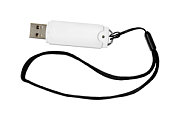
On of the reasons why USB memory is better than using a disk is that a USB drive can have a larger capacity than a CD. These drives can hold a lot more data because there is more drive space. The best thing about these drives is that you can reformat them. You can delete all of the information and use the space for something totally different. You don't have to buy a new one if you don't need the old information. With a CD, you can't reformat for reuse.

Even without reformatting a USB drive, you can use it for several different purposes and save tons of data and records. Along with that flexibility, it is also very small and portable. You can even carry it in your pocket or string it around your neck.

The prices depend on the amount of GB power the USB drive has. They are not that costly, but it may take time to pick out the right one, depending on the buyer's needs. They are quite available in any kind of computer hardware or software store.

Many people think that buying a USB drive is an unwise purchase because of the price and they end up buying a CD. When a CD is full, and there is no longer a use for the information, it can just be thrown away. You never have to throw away a USB drive because it is full and useless. They can be reformatted and used again.

The process of reformatting a USB flash memory is very easy and takes very little time. There is not a lot to learn. A right click on the USB icon will offer several options including reformatting. Click the reformat option on the menu and the drive can be deleted within minutes. The drive becomes clean again, making it ready for the new data.

Hence, we can see that reformatting a USB flash memory is not at all as complicated as some have thought. In fact, this task can be done by anyone who can click the mouse, even if they don't know a lot about operating a computer. Now that you know that a USB flash memory is a better deal than a CD, you can go to a store and buy one. You can also find them online. You can browse the internet for the best price on a USB flash memory drive and forget about using a CD for your data needs.
More Articles from
Computer Hardware Guide Pg291
A Play In One Act
Application Of Fiber Optics
Cable Internet Providers In
Ddts 100 Digital Decoder
Faster Internet For Free
Fiber Optic Internet Connection
Government Service Pay Scale
Great Deals On Travel
Hilltop Hoods State Of The Art
Kid Rock All Summer Long With Lyrics
Microsoft Games On Demand
Miss Julia Delivers The Goods
Phone Only No Service
Play Or Get Played
Unassisted Triple Play Baseball
Verizon Fios Offers Painless Installation
Verizon FiOS - Enjoy Your Online Entertainment
Verizon FiOS - What Are the Experts Saying?
Verizon FiOS Expands Across America
Verizon FiOS TV Has Landed
» More on
Computer Hardware Guide
  • Related Articles
  • Author
  • Most Popular
•Best Usb Flash Drives, by Erik Gauger
•Bootable Usb Flash Drives, by Derek Rogers
•Branded Usb Flash Drives, by Chriss
•Buy Usb Flash Drives, by John Sern
•Cool Usb Flash Drives, by Neil Morrical
Victor Epand has sinced written about articles on various topics from Shopping, Trucks and Interest. Victor Epand is an expert consultant for http://www.BuyRAM.info/ , a computer memory Super Store. BuyRAM.info carries a. Victor Epand's top article generates over 11100000 views. Bookmark Victor Epand to your Favourites.
Best Otc Acne Treatment
It can safely be used in creams, lotions, gels and soaps. These products should be used several times a day directly on the pimples as well as the skin around them
 
A Guide to Business | Guide to Technology | Guide to Women | Guide to Health | Family Guide to | Travel & Vacations | Information on Cars

EditorialToday IT Hardwares has 2 sub sections. Such as Computer Guide and Hardware. With over 20,000 authors and writers, we are a well known online resource and editorial services site in United Kingdom, Canada & America . Here, we cover all the major topics from self help guide to A Guide to Business, Guide to Finance, Ideas for Marketing, Legal Guide, Lettre De Motivation, Guide to Insurance, Guide to Health, Guide to Medical, Military Service, Guide to Women, Pet Guide, Politics and Policy , Guide to Technology, The Travel Guide, Information on Cars, Entertainment Guide, Family Guide to, Hobbies and Interests, Quality Home Improvement, Arts & Humanities and many more.
About Editorial Today | Contact Us | Terms of Use | Submit an Article | Our Authors