IT Hardwares

eg: UK or Brides UK or Classical Art or Buy Music or Spirituality
 
eg: UK or Brides UK or Classical Art or Buy Music or Spirituality
 
Business & Money
Technology
Women
Health
Education
Family
Travel
Cars
Entertainment
Featured Sites
SD Editorials
Online Guide and article directory site.
Foodeditorials.com
Over 15,000 recipes & editorials on food.
Lyricadvisor.com
Get 100,000 Lyric & Albums.
  • Business & Money
    • A Guide to Business
    • Guide to Finance
    • Ideas for Marketing
    • Legal Guide
    • Guide to Insurance
    • Lettre De Motivation
    • Guide to the Stock Market
    • Human Resource Career
    • Sales Marketing
    • Forex & Trading
    • Advertising & Marketing
    • Startup Guide
  • Technology
    • Guide to Technology
    • Cell Phones
    • Computer Software
    • IT Hardwares
    • Internet
    • Online Security
    • Cameras
    • Search Engine Optimization
    • Science & Technology
  • Women
    • Guide to Women
    • Relationship Advice
    • Marriage
    • Jewelry
    • Pregnancy
    • Fashion Style
    • Divorce Guide
    • Wedding Guide
    • Dating Guide
    • Natural Beauty
  • Health
    • Guide to Health
    • Guide to Medical
    • Plastic Surgery
    • Weight Loss
    • Sports
    • Body Wellness
    • Cancer Treatment
    • Common Illness
    • Health & Lifestyle
  • Education
    • Military Service
    • Politics and Policy
    • Arts & Humanities
    • Education and Teaching
    • Learn Languages
    • Colleges & Universities
  • Family
    • Quality Home Improvement
    • Hobbies and Interests
    • Family Guide to
    • Pet Guide
    • Loans Guide
    • Credit Cards
    • Gardening Guide
    • Home Security
    • Real Estate
    • Home Decor
    • Gift & Present
  • Travel
    • The Travel Guide
    • Adventure Travel
    • Cruise Ships
    • Beach Holiday
    • Travel Accommodation
    • Holiday Destinations
  • Cars
    • Information on Cars
    • Traffic Violations
    • Auto Insurance
    • Trailers
    • Sport Cars
    • The Bikes
  • Entertainment
    • Entertainment Guide
    • World Music
    • Photo & Video
    • Television & Games

Types Of Computer Memory

    View: 
Any device that holds data for a computer for a short period of time is called computer memory. If you have spent even just a little time with any computer, you will hear about RAM, Hard Disks, or CD's and DVD's. All these are means to store the information from a computer. The capacity and speed of storage varies much in these kinds of memory.


The Central Processing Unit of a computer is connected to the main memory. This main memory component is useful in storing the data and programs that are currently being run in the CPU. In modern computers the random access memory (RAM), a solid-state memory, is attached to the CPU using a memory bus. A memory bus is also called an address bus.

In addition to RAM, there may be a cache memory also, which contains small chunks of information that is to be used by the CPU soon. The idea is to reduce the fetching time, and thereby speed up the working of the CPU. Cache memory increases the throughput of the CPU, affecting the performance of the computer. In general, the RAM is the most important part of computer memory. RAM is made from integrated semiconductor chips.

RAM and Other Types of Memory:

The primary characteristic that separates RAM from other types of memory is the fact that any memory location RAM can be accessed at almost the same speed in a random manner. This is vastly different from the accessing approach used in other devices like the sequential one, used in tapes etc. Some RAM chips are volatile, meaning that as soon as the power supply is switched off to these chips, they lose all the data.

Some computers use a shadow RAM as well, which copies data present in ROM to make data availability faster, thereby helping increase the computer's speed and efficiency.

In earlier times, the cost of computer hardware was enormous, so whenever an upgrade was required, it was much cheaper to buy the parts and do an upgrade rather than to buy a new computer. This has changed. Now the cost of hardware has gone down, and it is easier to replace the whole computer than to buy a few parts.

This fall in prices is applicable to the desktop computers used by simple homeowners only. Replacing servers and high-end computers is still very expensive, so in the case where any new function or capacity expansion is required, it is easier and cheaper to replace parts such as computer memory.

RAM Configurations:

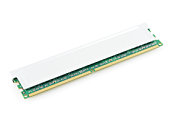
RAM chips are available in various configurations ranging from 128 MB to 1 GB for laptops and desktops. For normal usage, this much RAM is enough. If you wish to play many games, watch movies, or work on graphics, then you will need to have more RAM as all these applications are memory hungry. In such cases, buying a new system altogether is not a very logical solution. All the computers and laptops come with internal expansion slots that can be used to expand the memory.

An optimal amount of computer memory is essential, as unlike earlier times, our memory needs have grown. Normally, we have an email client, messenger, and music already running when we sit down to work on our computers. All of these have taken their share of memory already, leaving little behind for the application we want to launch for our work. These days 512 MB RAM is the recommended norm.
Types Of Computer Memory
Any device that holds data for a computer for a short period of time is called computer memory. If you have spent even just a little time with any computer, you will hear about RAM, Hard Disks, or CD's and DVD's. All these are means to store the information from a computer. The capacity and speed of storage varies much in these kinds of memory.

The Central Processing Unit of a computer is connected to the main memory. This main memory component is useful in storing the data and programs that are currently being run in the CPU. In modern computers the random access memory (RAM), a solid-state memory, is attached to the CPU using a memory bus. A memory bus is also called an address bus.

In addition to RAM, there may be a cache memory also, which contains small chunks of information that is to be used by the CPU soon. The idea is to reduce the fetching time, and thereby speed up the working of the CPU. Cache memory increases the throughput of the CPU, affecting the performance of the computer. In general, the RAM is the most important part of computer memory. RAM is made from integrated semiconductor chips.

RAM and Other Types of Memory:

The primary characteristic that separates RAM from other types of memory is the fact that any memory location RAM can be accessed at almost the same speed in a random manner. This is vastly different from the accessing approach used in other devices like the sequential one, used in tapes etc. Some RAM chips are volatile, meaning that as soon as the power supply is switched off to these chips, they lose all the data.

Some computers use a shadow RAM as well, which copies data present in ROM to make data availability faster, thereby helping increase the computer's speed and efficiency.

Cost:

In earlier times, the cost of computer hardware was enormous, so whenever an upgrade was required, it was much cheaper to buy the parts and do an upgrade rather than to buy a new computer. This has changed. Now the cost of hardware has gone down, and it is easier to replace the whole computer than to buy a few parts.

This fall in prices is applicable to the desktop computers used by simple homeowners only. Replacing servers and high-end computers is still very expensive, so in the case where any new function or capacity expansion is required, it is easier and cheaper to replace parts such as computer memory.

RAM Configurations:

RAM chips are available in various configurations ranging from 128 MB to 1 GB for laptops and desktops. For normal usage, this much RAM is enough. If you wish to play many games, watch movies, or work on graphics, then you will need to have more RAM as all these applications are memory hungry. In such cases, buying a new system altogether is not a very logical solution. All the computers and laptops come with internal expansion slots that can be used to expand the memory.

An optimal amount of computer memory is essential, as unlike earlier times, our memory needs have grown. Normally, we have an email client, messenger, and music already running when we sit down to work on our computers. All of these have taken their share of memory already, leaving little behind for the application we want to launch for our work. These days 512 MB RAM is the recommended norm.
More Articles from
Can't Get On The Internet
Advantages Of Bluetooth Technology
Broadband And Dial Up
Canon Compatible Printer Cartridges
Computer Systems And Architecture
Laser Printer Inkjet Printer
Remote Access And Desktop
Rfid Tags And Readers
Search Engine Optimization Consultants
The Best Web Browsers
Toner Cartridges For Canon
What Are Different Types Of Volcanoes
What Are Security Threats
What Is Dual Core Processor
What Is Windows 98
You May A Victim Of Software
What Are Telephone Metro Networks?
What Are the Business Benefits of Using a Structured Cabling System?
What Are the Advantages of VoIP?
What Are The Advantages To Owing An Apple Ipod Nano?
What Are The Features Of Delphi XM Roady Radio?
» More on
Computer Hardware Guide
  • Related Articles
  • Author
  • Most Popular
•Different Types Of Computer Memory, by Michael Russell
•Types Of Computer Games, by Victor Epand
•Types Of Computer Memory, by Paul Maciver
•Types Of Computer Viruses, by 5252
Paul Maciver has sinced written about articles on various topics from Credit Cards, Family and Computers and The Internet. . Paul Maciver's top article generates over 1000000 views. Bookmark Paul Maciver to your Favourites.
Car And Boat Trailer
There are used car dealers and the prospective seller can contact them. But getting attached to Chevrolet Corvette is so easy, few think of getting rid of it
 
A Guide to Business | Guide to Technology | Guide to Women | Guide to Health | Family Guide to | Travel & Vacations | Information on Cars

EditorialToday IT Hardwares has 2 sub sections. Such as Computer Guide and Hardware. With over 20,000 authors and writers, we are a well known online resource and editorial services site in United Kingdom, Canada & America . Here, we cover all the major topics from self help guide to A Guide to Business, Guide to Finance, Ideas for Marketing, Legal Guide, Lettre De Motivation, Guide to Insurance, Guide to Health, Guide to Medical, Military Service, Guide to Women, Pet Guide, Politics and Policy , Guide to Technology, The Travel Guide, Information on Cars, Entertainment Guide, Family Guide to, Hobbies and Interests, Quality Home Improvement, Arts & Humanities and many more.
About Editorial Today | Contact Us | Terms of Use | Submit an Article | Our Authors