IT Hardwares

eg: UK or Brides UK or Classical Art or Buy Music or Spirituality
 
eg: UK or Brides UK or Classical Art or Buy Music or Spirituality
 
Business & Money
Technology
Women
Health
Education
Family
Travel
Cars
Entertainment
Featured Sites
SD Editorials
Online Guide and article directory site.
Foodeditorials.com
Over 15,000 recipes & editorials on food.
Lyricadvisor.com
Get 100,000 Lyric & Albums.
  • Business & Money
    • A Guide to Business
    • Guide to Finance
    • Ideas for Marketing
    • Legal Guide
    • Guide to Insurance
    • Lettre De Motivation
    • Guide to the Stock Market
    • Human Resource Career
    • Sales Marketing
    • Forex & Trading
    • Advertising & Marketing
    • Startup Guide
  • Technology
    • Guide to Technology
    • Cell Phones
    • Computer Software
    • IT Hardwares
    • Internet
    • Online Security
    • Cameras
    • Search Engine Optimization
    • Science & Technology
  • Women
    • Guide to Women
    • Relationship Advice
    • Marriage
    • Jewelry
    • Pregnancy
    • Fashion Style
    • Divorce Guide
    • Wedding Guide
    • Dating Guide
    • Natural Beauty
  • Health
    • Guide to Health
    • Guide to Medical
    • Plastic Surgery
    • Weight Loss
    • Sports
    • Body Wellness
    • Cancer Treatment
    • Common Illness
    • Health & Lifestyle
  • Education
    • Military Service
    • Politics and Policy
    • Arts & Humanities
    • Education and Teaching
    • Learn Languages
    • Colleges & Universities
  • Family
    • Quality Home Improvement
    • Hobbies and Interests
    • Family Guide to
    • Pet Guide
    • Loans Guide
    • Credit Cards
    • Gardening Guide
    • Home Security
    • Real Estate
    • Home Decor
    • Gift & Present
  • Travel
    • The Travel Guide
    • Adventure Travel
    • Cruise Ships
    • Beach Holiday
    • Travel Accommodation
    • Holiday Destinations
  • Cars
    • Information on Cars
    • Traffic Violations
    • Auto Insurance
    • Trailers
    • Sport Cars
    • The Bikes
  • Entertainment
    • Entertainment Guide
    • World Music
    • Photo & Video
    • Television & Games

Hard Drives For Computers

    View: 
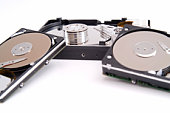
Hard Disk Drives (HDD's or Hard Drives for short) are a vitally important part of one's computer; they store all your information (programs, MP3's, work etc) on. Each computer system must have at least one Hard Drive, some have multiple drives. They can be both internal (inside the computer) and external (outside the computer). Hard Drives are the slowest part of one's computer. The size of a hard drive is measured in Gigabytes (GB). If you have lots of files it is worthwhile purchasing a larger drive.


There a few main types of Hard Drives available today:

SCSI - These are the fastest hard drives available. They are generally only used in servers and times where only the very best reliability is needed. These are also the most expensive. Speeds can be up to 320 MB/s.

SATA - This technology is relatively new. SATA drives are becoming the standard for desktop computers. SATA drives can achieve speeds of up to 375 MB/s. If you have an older computer you may need to purchase a converter card so your computer can use this technology. SATA can be used for both internal and external drives (providing the computer the drive is to be used on supports external SATA).

IDE (or PATA) - This technology has been used for many years. Most (if not all) systems in the last 15 years will support this technology. This type of Hard Drive is being replaced by the SATA drive. IDE hard drives can achieve speeds of up to 133MB/s.

USB/ Fire wire - These technologies are used for external hard drives. USB2 is the most common connection for an external drive. These drives are slower than the internal ones; the max speed for these types of drives is 60MB/s.

In addition to the type of hard drive it is also worth looking at the Spin Speed of the drive. These can vary from as slow as 4800RPM (usually for laptop hard drives) and to as fast as 15000RPM (usually for SCSI drives). The average speed is 7200RPM.

Cache size is also an important factor to consider. Usually hard drives have a cache of between 8MB and 16MB. The cache is where the data is stored before it is written to the hard disk. The cache is much faster than the drive itself.

The main manufactures for internal hard drives are Maxtor, Western Digital, Seagate and IBM. For external hard drives (in addition to those aforementioned) Freecom and LaCie.
Hard Drives For Computers
Hybrid hard drives, or H-HDD combine these two technologies to offer an increase in performance as well as an improvement in power consumption. The flash memory is stored onboard the hard drive and picks up where a normal hard drive leaves off. You can get much higher speed as the mechanical latency associated with most hard drive is not there. Power consumption can be improved because frequently used application data can be stored and then pulled from the flash memory.

These advantages apply mostly to notebook hard drives. Laptop drives are much slower than desktop hard drives, and power drain is a big concern. With these additions H-HDD manufacturers hope to make laptop hard drives reach similar speeds to their desktop counterparts.

Currently, hybrid hard drives require that you run Windows Vista, not because it needs Vista, but because it needs ReadyDrive, a feature that comes with Vista. Which data is stored on the flash part of the drive is controlled by the operating system, and in Vista, ReadyDrive takes care of this. ReadyDrive sees how you use your programs and which ones you use the most, it then puts the most heavily accessed application data onto the flash memory part of the hard drive.

Power is saved when there is a read/write done onto the flash portion of the disk. Because there is no motor, flash media draws much less power. However, when the data is written to the disk the motor still needs to be used and therefore uses that power that was saved.

The super-fast access speeds of the flash disk more than make up for the lower transfer rates that is able to maintain. The fast cache that has become an integral part of hard drives is not replace in these models, but the flash part just complements the functions of the drive.

In actual use there is not really much advantage to this kind of hard drive. Despite some hype, there is very noticeable difference in real world applications and doesn't save much power either. Just wait for flash-only drives to come down in price, which is already happening, or for now just use a traditional model.
More Articles from
Things To Do On Internet
Best Business Start Up
Deleted Data Recovery Software
How To Block A Phone Call
How To Block Sender
How To Block Spam Mail
How To Make A Free Banner
How to Become a Web Expert Without Spending A Dime
How To Become An Ultimate Blogger
How To Benefit From Expiring Domains
How To Begin Your Own Article Directory
How to become a successful On the Internet
How to Bind Documents With the Fastback System
How to Best Use Craigslist Phone Verified Accounts
How to Become a Frustrated Artist, With Little or No Investment
How To Block Direct Image Linking Using .htaccess
How to Become an Internet Marketer
How To Become An Epic Leader On The Web
How to Become a Knowledge Peddler
How to Become an Affiliate Blogger Using Wordpress Websites
How To Benefit The Most From Your Business Opportunity
» More on
Computer Hardware Guide
  • Related Articles
  • Author
  • Most Popular
•Ata Sata Hard Drives, by Mac Mcclellan
•Best Deal For Computers, by Nishu Widlon
•Cd Burners For Computers, by Daniel Travers
•Data Recovery Hard Drives, by T J Madigan
•External Drives For Backup, by Yuri Filimonov
About Author
Both Ivanovich Cuxev & Peter Stewart are contributors for EditorialToday. The above articles have been edited for relevancy and timeliness. All write-ups, reviews, tips and guides published by EditorialToday.com and its partners or affiliates are for informational purposes only. They should not be used for any legal or any other type of advice. We do not endorse any author, contributor, writer or article posted by our team.

Ivanovich Cuxev has sinced written about articles on various topics from Hair Styles, Supplements and Software. JBO Solutions Supplies Cheap Computers and Computer Co. Ivanovich Cuxev's top article generates over 110000 views. Bookmark Ivanovich Cuxev to your Favourites.

Peter Stewart has sinced written about articles on various topics from Family, Bad Breath and Computers and The Internet. Computer-buying-guide.com's hard drive section will give you all the latest information you need to know about hard drives and give you help in choosing. Peter Stewart's top article generates over 49500 views. Bookmark Peter Stewart to your Favourites.
Charlie Chaplin's Modern Times
With so many outstanding features tucked under their belt it rarely should come as a surprise that self catering cottages are the demand of modern generation and are here to stay
 
A Guide to Business | Guide to Technology | Guide to Women | Guide to Health | Family Guide to | Travel & Vacations | Information on Cars

EditorialToday IT Hardwares has 2 sub sections. Such as Computer Guide and Hardware. With over 20,000 authors and writers, we are a well known online resource and editorial services site in United Kingdom, Canada & America . Here, we cover all the major topics from self help guide to A Guide to Business, Guide to Finance, Ideas for Marketing, Legal Guide, Lettre De Motivation, Guide to Insurance, Guide to Health, Guide to Medical, Military Service, Guide to Women, Pet Guide, Politics and Policy , Guide to Technology, The Travel Guide, Information on Cars, Entertainment Guide, Family Guide to, Hobbies and Interests, Quality Home Improvement, Arts & Humanities and many more.
About Editorial Today | Contact Us | Terms of Use | Submit an Article | Our Authors